> ## Documentation Index
> Fetch the complete documentation index at: https://docs.granvl.com/llms.txt
> Use this file to discover all available pages before exploring further.
# Navigating the dashboard
> A screenshot-led walkthrough of funnels, campaigns, and tracking once setup is complete.
The [quickstart](/quickstart) covers the path from a blank workspace to a live, tracked funnel. This page is the day-to-day map: what to open, what to read first, and what action to take next.
## The sidebar
| Section | What lives there |
| ------------------------- | ----------------------------------------------------------------------------------------------------- |
| **Home** | The [built-in agent's](/concepts/built-in-agent) composer, workspace roll-up, and copilot suggestions |
| **Strategy** | Products, ICPs, angles, research, and the copy library. See [Strategy](/concepts/strategy) |
| **Campaigns** | Campaign hubs with spend, traffic, and conversions rolled up by initiative |
| **Build → Funnels** | Every funnel you have built |
| **Build → Meta ads** | The live native ad channel. Google is marked coming soon; Microsoft has not landed yet |
| **Assets → Creative** | Images and video used in ads |
| **Assets → Lead magnets** | Hosted files served from your own domain |
| **Assets → Storage** | The wider file library and the workspace quota |
| **Resources → Templates** | Proven funnel starting points |
| **Agents** | Connect your own agent over MCP. See [Connect your agent](/connect-your-agent) |
| **Settings** | Everything workspace-level. See [Settings](/guides/settings) |
Meta is the live native ad channel. Your agent can bring spend and campaign structure from other platforms into granvl with `record_ad_entities` and `record_ad_spend`, so those numbers can still sit beside first-party conversions.
## Find and evaluate a funnel
**What to do.** Open **Funnels**, sort by visitors, conversions, or conversion rate, and filter by domain, platform, or date range. Each row reports traffic and conversions for the window you selected.
**Why it matters.** This is the fastest way to see which offers are pulling their weight before you spend time inside any one funnel.
 **What to do.** Open a funnel and read the top bar for the selected window: **leads**, **conversion rate**, and **visitors**, with the trend line below.
**Why it matters.** These are the same three first-party numbers granvl checks before suggesting an optimization. Read them before changing copy, traffic weights, or budget.
**What to do.** Open a funnel and read the top bar for the selected window: **leads**, **conversion rate**, and **visitors**, with the trend line below.
**Why it matters.** These are the same three first-party numbers granvl checks before suggesting an optimization. Read them before changing copy, traffic weights, or budget.
 **What to do.** Scroll to the variant table. Review traffic split, visitors, conversions, and conversion rate. granvl marks the current leader, and **Archive** lets you retire a variant without losing its history.
**Why it matters.** The table shows what is leading, but an early lead is not automatically trustworthy. Use the traffic and confidence thresholds before acting.
**What to do.** Scroll to the variant table. Review traffic split, visitors, conversions, and conversion rate. granvl marks the current leader, and **Archive** lets you retire a variant without losing its history.
**Why it matters.** The table shows what is leading, but an early lead is not automatically trustworthy. Use the traffic and confidence thresholds before acting.
 Do not act on fewer than about 100 visitors per variant. Promotion and pause decisions have stricter requirements. See [When a result is safe to act on](/concepts/variants-and-testing#when-a-result-is-safe-to-act-on).
**What to do.** Continue to the step canvas to compare movement between pages. On quiz and form pages, open the question-level breakdown.
**Why it matters.** A page can have a healthy overall conversion rate while one step or question is losing most visitors. The drop-off view tells you where the next test belongs.
## Read campaign performance
Campaign reporting has two levels: a cross-platform overview and the row-level detail inside a channel.
**What to do.** Open **Campaigns** and review revenue, ad spend, ROAS, leads, and CPQL for the selected date range, channel, and status.
**Why it matters.** Start with one question: is cost per qualified lead moving in the direction you want? That tells you whether the issue deserves a deeper campaign, funnel, or qualification review.
Do not act on fewer than about 100 visitors per variant. Promotion and pause decisions have stricter requirements. See [When a result is safe to act on](/concepts/variants-and-testing#when-a-result-is-safe-to-act-on).
**What to do.** Continue to the step canvas to compare movement between pages. On quiz and form pages, open the question-level breakdown.
**Why it matters.** A page can have a healthy overall conversion rate while one step or question is losing most visitors. The drop-off view tells you where the next test belongs.
## Read campaign performance
Campaign reporting has two levels: a cross-platform overview and the row-level detail inside a channel.
**What to do.** Open **Campaigns** and review revenue, ad spend, ROAS, leads, and CPQL for the selected date range, channel, and status.
**Why it matters.** Start with one question: is cost per qualified lead moving in the direction you want? That tells you whether the issue deserves a deeper campaign, funnel, or qualification review.
 **What to do.** Open **Meta ads** and move between Campaigns, Ad sets, and Ads. Sort the table by spend, CPC, CPM, CTR, Meta conversions, or granvl conversions. Open an ad thumbnail to inspect the full creative.
**Why it matters.** Meta's conversion count and granvl's first-party count are two different signals. Reading them side by side is how you catch drift between platform attribution and what actually happened on your funnel.
**What to do.** Open **Meta ads** and move between Campaigns, Ad sets, and Ads. Sort the table by spend, CPC, CPM, CTR, Meta conversions, or granvl conversions. Open an ad thumbnail to inspect the full creative.
**Why it matters.** Meta's conversion count and granvl's first-party count are two different signals. Reading them side by side is how you catch drift between platform attribution and what actually happened on your funnel.
 **What to do.** Group a funnel and its related ad campaigns into a named hub, usually one per brand, offer, or marketing initiative.
**Why it matters.** A hub rolls up spend, traffic, and conversions from the linked platforms without changing or owning the underlying funnel and campaigns.
**What to do.** Group a funnel and its related ad campaigns into a named hub, usually one per brand, offer, or marketing initiative.
**Why it matters.** A hub rolls up spend, traffic, and conversions from the linked platforms without changing or owning the underlying funnel and campaigns.
 See [Campaigns](/concepts/campaigns) for how hubs behave.
### What the metrics measure
| Metric | What it measures | Where it lives |
| ---------------- | ------------------------------------------------------------------------------------------- | ------------------------------- |
| **Meta conv.** | Raw platform-reported conversions, unfiltered | Meta ads |
| **granvl conv.** | granvl's first-party count for the same traffic, joined independently of the platform pixel | Beside the platform number |
| **CPQL** | Spend divided by qualified leads rather than every form submission | Campaigns overview and Meta ads |
| **ROAS** | Revenue divided by spend once a conversion source reports revenue | Campaigns overview |
A campaign can look cheap on raw conversions and expensive on CPQL. That gap is often the more honest signal. ROAS stays empty until a CRM, store, or `record_external_conversion` reports revenue back.
## Confirm tracking before trusting a number
Tracking is set once per domain, not once per campaign. When reporting looks wrong, check the domain before diagnosing the campaign.
**What to do.** Open **Settings → Tracking** and find the domain used by the funnel. Review the status for each configured platform.
**Why it matters.** A broken pixel often under-reports without throwing a visible error. This should be the first check when spend and conversions stop agreeing.
See [Campaigns](/concepts/campaigns) for how hubs behave.
### What the metrics measure
| Metric | What it measures | Where it lives |
| ---------------- | ------------------------------------------------------------------------------------------- | ------------------------------- |
| **Meta conv.** | Raw platform-reported conversions, unfiltered | Meta ads |
| **granvl conv.** | granvl's first-party count for the same traffic, joined independently of the platform pixel | Beside the platform number |
| **CPQL** | Spend divided by qualified leads rather than every form submission | Campaigns overview and Meta ads |
| **ROAS** | Revenue divided by spend once a conversion source reports revenue | Campaigns overview |
A campaign can look cheap on raw conversions and expensive on CPQL. That gap is often the more honest signal. ROAS stays empty until a CRM, store, or `record_external_conversion` reports revenue back.
## Confirm tracking before trusting a number
Tracking is set once per domain, not once per campaign. When reporting looks wrong, check the domain before diagnosing the campaign.
**What to do.** Open **Settings → Tracking** and find the domain used by the funnel. Review the status for each configured platform.
**Why it matters.** A broken pixel often under-reports without throwing a visible error. This should be the first check when spend and conversions stop agreeing.
 **What to do.** Open the domain's platform configuration and use **Send test event** to fire a synthetic conversion through the platform's own debug tools.
**Why it matters.** This confirms that an event actually arrives. Saved credentials alone only prove that values were entered.
**What to do.** Open the domain's platform configuration and use **Send test event** to fire a synthetic conversion through the platform's own debug tools.
**Why it matters.** This confirms that an event actually arrives. Saved credentials alone only prove that values were entered.
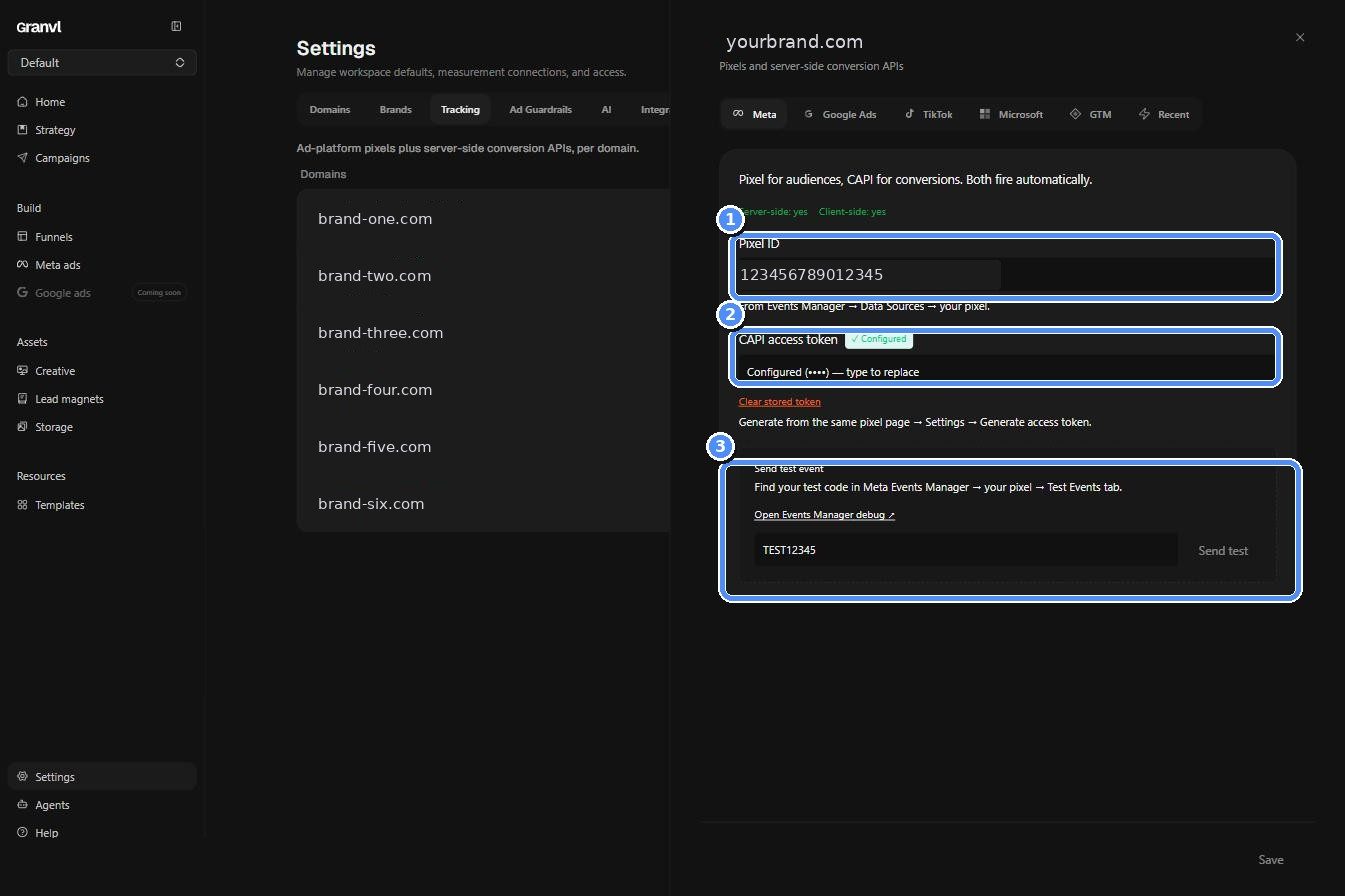 When campaign reporting looks wrong, verify tracking before changing the campaign. A silently broken pixel is a more common explanation than a sudden performance collapse.
## Where the freshest numbers are
| Screen | Refresh |
| ---------------------- | ------------------------------------------------- |
| Funnel detail | About 10 seconds |
| Home and campaign hubs | About 30 to 60 seconds |
| Ads data | Daily automatic sync, plus **Sync now** on demand |
If an ads read is empty, ask your agent to run `get_ad_data_status`. It reports the last successful sync, staleness, in-progress work, failures, missing connections, or an empty warehouse instead of guessing.
When campaign reporting looks wrong, verify tracking before changing the campaign. A silently broken pixel is a more common explanation than a sudden performance collapse.
## Where the freshest numbers are
| Screen | Refresh |
| ---------------------- | ------------------------------------------------- |
| Funnel detail | About 10 seconds |
| Home and campaign hubs | About 30 to 60 seconds |
| Ads data | Daily automatic sync, plus **Sync now** on demand |
If an ads read is empty, ask your agent to run `get_ad_data_status`. It reports the last successful sync, staleness, in-progress work, failures, missing connections, or an empty warehouse instead of guessing.